H5Game.Life field guide
World Puzzle Guide
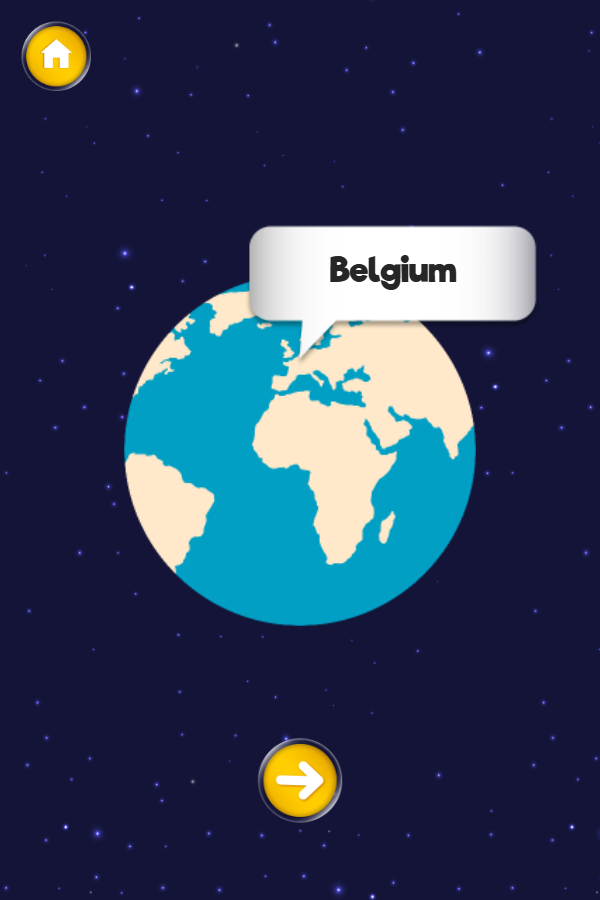
Our July 30 Chrome launch check moved past World Puzzle's title screen and reached a country card labeled Belgium.
Play World PuzzleHow the game works
Our July 30 Chrome launch check moved past World Puzzle's title screen and reached a country card labeled Belgium. The country name appeared in a speech panel above a globe centered on Europe and Africa, with a single forward arrow below it and a Home button in the upper-left corner. That observed layout makes this a location-recognition activity with one prompt at a time, not a jigsaw board or a generic match-three puzzle as the old catalog copy implied.
Controls
Press the large Play button to enter the country screen. Read the country label above the globe and use the on-screen arrow to continue through the sequence; Home returns to the title screen.
Practical tips
- Read the country label first, then locate its continent before narrowing the position on the globe.
- Use nearby coastlines and the relative position of neighboring regions instead of relying only on country size.
- Return through Home and repeat a sequence when a country name is familiar but its location is not.
Before you start
Checked in Google Chrome 150 at a 600 × 900 portrait viewport. The self-hosted build opened from the green Play button to the Belgium prompt without showing an advertising overlay.
Real browser check
- Checked
- July 30, 2026
- Browser
- Google Chrome 150.0.7871.187
- Viewport
- 600 × 900
- Scope
- Launch/render check only; not represented as a full gameplay review.
Why this game is in the edited collection
Selected because the browser check reached the activity screen and corrected a misleading generic catalog description with directly observed prompt, globe, navigation, and Home controls.